Tuesday, March 31, 2015

Google Apps Update Alert


Google Apps update alerts

Link to Google Apps update alerts

Posted: 30 Mar 2015 02:58 PM PDT
People using Google Sheets will now have more powerful conditional formatting options. This launch will add the following features:
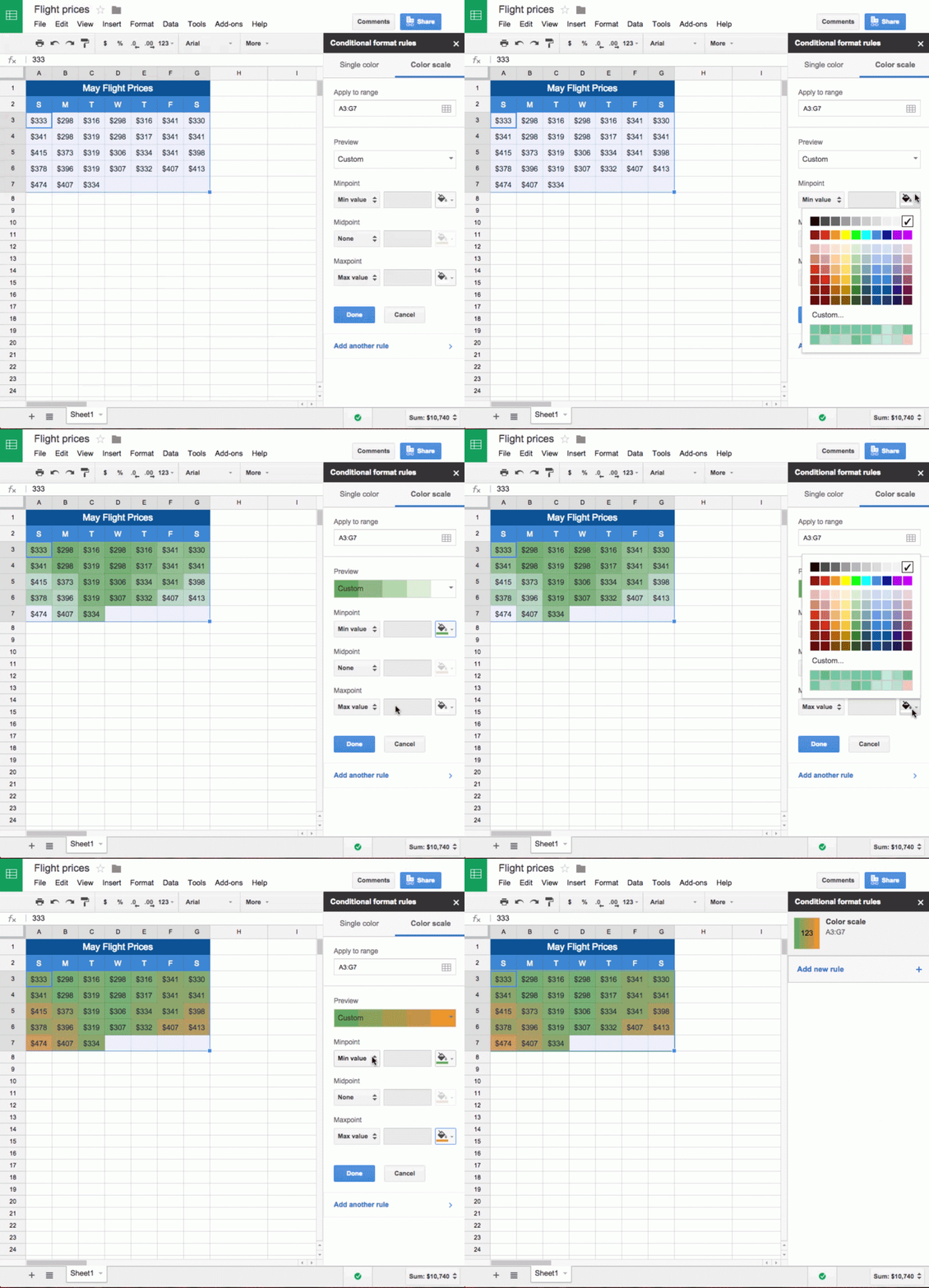
  • Ability to add gradient conditional formatting rules (e.g. green -> orange, where the lowest numbers are shaded green and the highest are shaded orange, with gradient shades in between)
  • More style choices like bolding, striking through, and italicizing text based on conditional formatting rules
  • A new look for the conditional formatting editing pane
  • Import/export of color scale conditional formatting

conditional_formatting.gif

Conditional formatting can be added by highlighting the relevant cells and selecting Format > Conditional formatting from the menus.

Release track:
Rapid release and Scheduled release

For more information:
Help Center


Note: all launches are applicable to all Google Apps editions unless otherwise noted

Launch release calendar
Get these product update alerts by email
Subscribe to the RSS feed of these updates
Posted: 30 Mar 2015 02:42 PM PDT
Google Drive allows you to store and access your files anywhere—on the web, on your hard drive, or on the go. We’re now making it easier to store and organize your photos and videos in Google Drive as well.

Moving forward, people using Google+ Photos will see their photos and videos automatically in Google Drive. They will appear in a new menu item called Google Photos, and can be shared, moved, and renamed like any other Drive file:

android_drive_photos_800w.png

This feature will start rolling out for consumers today in Drive for Android, iOS and the web, and will roll out gradually to Apps customers in the coming weeks. A notification in Drive will give people the option to add a Google Photos folder to My Drive, allowing them to manage their photos and videos alongside other types of files if they so choose. Existing Google+ Photos users will notice their photos and videos available in Drive in the coming weeks.

Note: photos and videos backed up to Drive via Auto Backup will not count towards storage quota, but Apps users may want to review their Google+ Photos Auto Backup settings to avoid inadvertent syncing to their corporate Drive account.

See the Help Center for more information on organizing, syncing and deletion options.

Release track:
Rapid release (gradual rollout) starting in the coming weeks, with Scheduled release to follow two weeks after rollout to Rapid. See the release calendar for specific dates as they are available.

For more information:
Help Center
Get the latest Google Drive apps from Google Play and the App Store
Drive blog post


Note: all launches are applicable to all Google Apps editions unless otherwise noted

Launch release calendar
Get these product update alerts by email
Subscribe to the RSS feed of these updates
Posted: 30 Mar 2015 02:11 PM PDT
A new version of the Gmail app for Android is now available on Google Play. New features include:
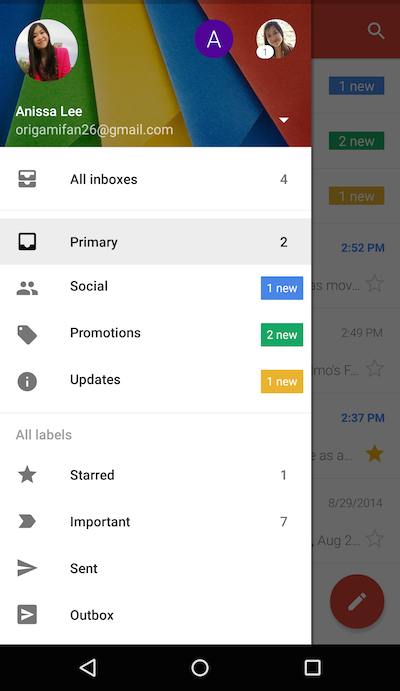
  • All your inboxes in one place―view all your mail at once, regardless of whether it’s from your work or personal accounts, using the new “All Inboxes” option. This way you can read and respond to all your messages without having to hop between accounts.
all_inboxes.png
  • Conversation View―if you’ve set up separate inboxes in Gmail for your Yahoo, Outlook.com and other IMAP/POP accounts, messages in these accounts will appear neatly stacked as one conversation, just like your Gmail messages.
  • Smarter Search―searching in the Gmail app for Android now comes with better auto-complete, so you can find what you need even faster.
  • Other helpful features―larger attachment previews to help you see what’s inside, the ability to save to Drive with a single tap, and new animations that make opening and closing conversations more smooth.

Note: The search auto-complete feature is not available for Google Apps for Government customers

Release track:
Rapid release and Scheduled release

For more information:
Get the latest Gmail app for Android on Google Play


Note: all launches are applicable to all Google Apps editions unless otherwise noted

Launch release calendar
Get these product update alerts by email
Subscribe to the RSS feed of these updates

Monday, March 30, 2015

The Inaugural EdCampSoJersey a HUGE Success!


"If you build it, he will come!"  That line is from the 1989, The Field of Dreams movie starring Kevin Costner.  All I can say is, it is true!  The inaugural EdCamp South Jersey event was a huge success! We had 137 attendees, a full session board, and most importantly, we had a great day learning and sharing with other educators, administrators, technology staff, parents and students


Considering this was the first Edcamp in Southern New Jersey, I was surprised to see the session board fill up quickly!  People stepped out of their comfort zone to present on a topic they were passionate about.   It was amazing to see the session board come alive! The sessions ranged from technology, STEM, digital portfolios, to special education topics to bridging the gap between teachers and administrators and much more!. Click on the link to access the session board. 


One of the sessions I attended was on 3D printing by Kevin Jarrett. I learned so much in this session.  I was curious about creating my own 3D images.  He suggested to use Tinkercad or SketchUp to perform this task.  He had everyone create a Tinkercad account and we went over a few features of the application.  He also explained how to change the filament in a 3D printer, and also printed out a 3D object on the Makerbot Replicator printer.  


The next session I attended was on Gamificiation by Chris Aviles.  He demonstrated his grading system by increasing the points for questions, quizzes, and assessments, He explained how he redefined his terminology to reflect a gaming atmosphere. It really put a new twist and a different perspective on traditional grading and classroom assignments.


Another session I attended was Dave Zirkle's session on Maker Meetup.  He explained the process of taking old and/or broken toys, computers, and electronic devices, and restores them into working robots.  He modeled the parts needed to rebuild a broken toy and also explained how to code and download it to the toy.


Finally, my session was on the importance of digital portfolios.  Cynthia Leatherwood and I presented different methods of using digital portfolios.  She uses it to keep a writing portfolio for her students.  Cynthia has her students create and share folders with her so that she has access to her student's writing assignments using Google Drive.  I use digital portfolios to track technology literacy for the 8th grade students by using a digital portfolio template that I created in Powerpoint and Google Slides.  Students must insert their assignments into the digital portfolio template in which I grade.  The template is outlined with section requirements and specifications.  Click here to view the digital portfolio template in Google Slides.

In conclusion, it was an awesome day!  There were new friends made, and some were reunited with old colleagues.  However, I know for certain, there was a lot learning taking place within the walls of the William Davies Middle School that day.  


The Davies Technology Department - Reunited

Some of the Edcamp South Jersey Organizers


Thank you to all the organizers who made this event a true success.  I enjoyed working with everyone and I look forward to planning the second #Edcampsojersey event in March 2016. 

Click here to view more pictures from Edcamp South Jersey